Advertising Disclosure: We may earn a commission when you buy through links on this page.
Plesk Review 2026: Is Plesk Worth It? We Break Down Every Plan
Last updated November 2026 · Researched from plesk.com, G2, Capterra and other independent review sources

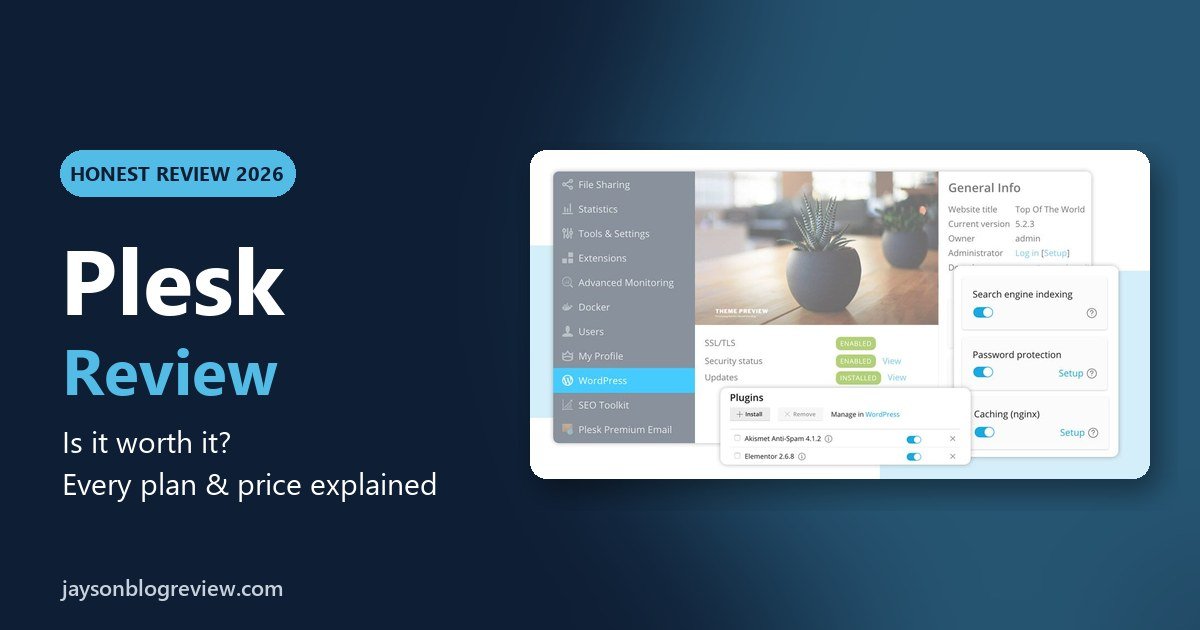
The Plesk dashboard, the control panel this Plesk review covers
If you run a VPS or dedicated server, sooner or later you have to decide how you will manage it. You can use the command line, a free open-source panel, or a commercial panel with a visual dashboard. This Plesk review is for anyone weighing that last option and wondering whether the monthly licence fee is justified.
Plesk is a web hosting and server management platform that puts websites, servers, security and WordPress in one dashboard. It is sold as a per-server licence in several editions, from a small-site plan to a full hosting-business plan. This is a researched review, not a hands-on test: we built it from the prices published on plesk.com, Plesk's own product information and what verified users say on review sites. Our bottom line: Plesk is a polished, well-supported panel that suits agencies, freelancers and hosting providers, but it costs more than free alternatives and prices are rising in 2027.
Quick Verdict
- Best for: freelancers, agencies and small hosting businesses that want a visual panel with strong WordPress tools and support
- Skip if: you are comfortable on the command line, run a single hobby site, or need the lowest possible server cost
- Price range: from $15.57 per month (paid annually) for Web Admin to $64.16 per month (paid annually) for Web Host on a dedicated server, at time of writing (November 2026)
- Our rating: 4.2/5, based on published features, pricing and a G2 score of about 4.3/5 and a Capterra score of 4.7/5
What Is Plesk?
Plesk describes itself as a WebOps platform for running, automating and growing websites, applications and hosting businesses. In practice, it is a web-based control panel that you install on your own server. From it you create websites, manage domains and email, install WordPress, handle security settings and add features through extensions.
According to the company's about page, Plesk runs on more than 384,000 servers, automates over 11 million websites and 15 million mailboxes, and is available in more than 32 languages across 140 countries. It has been around since the early 2000s, and the company says 50 percent of the top 100 service providers worldwide partner with it. A notable selling point is that it is OS agnostic, so it is not tied to a single operating system, subject to what the documentation lists as supported.
Licensing is per server, with pricing for virtual private servers and for dedicated servers. You can also get Plesk pre-installed through hyperscaler and cloud partners if you do not have a server yet.
Is Plesk Legit?
Yes. Plesk is an established product with a long track record and a large installed base, and it publishes its pricing, trial terms and refund policy openly. Independent sentiment is generally positive: G2 shows roughly 4.3 out of 5 from about 276 reviews, and Capterra shows 4.7 out of 5 from 148 reviews, with ease of use at 4.6 and support at 4.3.
It is not flawless. A small aggregate of 15 reviews, including Trustpilot, averaged about 3.3 out of 5, mostly over migration difficulty and the 2026 price increases. Plesk also does not accept payments from Russia and cannot serve account holders there. Treat the low-volume scores with caution, but take the pricing and migration complaints seriously.
Plesk Plans and Key Features, Reviewed
1. Web Admin Edition: Best for a handful of simple sites
Price: $15.57 per month paid annually ($16.99 monthly) at time of writing, November 2026 · Domains: 10 · Best for: small sites and basic server administration
The Web Admin Edition is the entry point and is built for straightforward website and server administration. It covers up to 10 domains and includes Sitejet Builder and WP Toolkit SE, the slimmed-down edition of the WordPress tool. Pricing is the same on VPS and dedicated servers, which keeps things simple. If you host a personal site, a few small business sites or a side project, this edition gives you the essential tools without paying for extras you will not use. The main limit is the domain cap, so growth means upgrading.
Pros
- Lowest price of the three main editions
- Includes Sitejet Builder and WP Toolkit SE
- Same price on VPS and dedicated servers
Cons
- Only 10 domains
- WordPress tools are the SE version rather than the full toolkit
2. Web Pro Edition: Best for developers and designers
Price: $27.49 per month paid annually ($29.99 monthly) at time of writing, November 2026 · Domains: 30 · Best for: web professionals and small agencies
Plesk positions the Web Pro Edition as the complete solution for web developers and designers. You get 30 domains, Sitejet Builder, the full WP Toolkit and what Plesk calls flexible project management, meaning you can build, secure, optimize and automate sites with more advanced tools. For most freelancers and small agencies this is the sweet spot, because the full WordPress toolkit is what saves the most time when you manage many client sites. The jump from Web Admin is noticeable in price, so make sure you will use the extra domains and tools.
Pros
- Full WP Toolkit and 30 domains
- Advanced tools for building, securing and automating sites
- Same price on VPS and dedicated servers
Cons
- Roughly $12 more per month than Web Admin when paid annually
- Not meant for reselling hosting to clients
3. Web Host Edition: Best for growing a hosting business
Price: $57.74 per month on VPS or $64.16 on dedicated, paid annually ($62.99 and $69.99 monthly) at time of writing, November 2026 · Domains: unlimited · Best for: hosting providers and resellers
The Web Host Edition is aimed at people who build and grow a hosting business on Plesk. It offers unlimited domains, multi-tenant management and provisioning, alongside Sitejet Builder and WP Toolkit. It is the first edition where VPS and dedicated pricing differ, with dedicated costing a little more. If you only host your own sites, you are paying for capabilities you will not need. If you resell hosting, the unlimited domains and customer management are exactly the point.
Pros
- Unlimited domains
- Multi-tenant management and provisioning for reselling
- Includes Sitejet Builder and WP Toolkit
Cons
- Costs more than double Web Pro
- Overkill for anyone who is not reselling hosting
4. Partner and Business Plans: Best for larger providers
Price: custom, with a monthly minimum of $250 at time of writing, November 2026 · Domains: per agreement · Best for: established hosting companies
Plesk also runs Partner and Business plans that you apply for rather than buy off the shelf. They offer access to all Plesk editions and extensions, Sitejet Builder, partner discounts of up to 45 percent, priority 24/7 support and a dedicated account manager. The monthly minimum is $250, so this tier only makes sense at real scale. For a large hosting company, the discounts and account management can change the economics considerably.
Pros
- Partner discounts up to 45 percent
- Priority 24/7 support and a dedicated account manager
- Access to every edition and extension
Cons
- $250 monthly minimum
- Application required, so pricing is not fully transparent
5. WP Toolkit: Best for managing many WordPress sites
Price: included (WP Toolkit SE with Web Admin, full WP Toolkit with Web Pro) at time of writing, November 2026 · Domains: depends on edition · Best for: WordPress users

The WP Toolkit dashboard inside Plesk
WordPress is the main reason many people choose Plesk, and WP Toolkit is the tool behind that. It brings WordPress installation and management into the same dashboard as the rest of your server, so you are not juggling separate tools for each site. Which version you get depends on your edition: the SE version comes with Web Admin and the full version with Web Pro. Reviewers frequently praise the interface and ease of setup, though some mention that the plugin ecosystem feels limited compared with rivals.
Pros
- WordPress managed from one dashboard
- Full version included with Web Pro
Cons
- Fewer capabilities in the SE version
- Some users find the plugin options limited
6. Sitejet Builder: Best for building client sites quickly
Price: included in every edition at time of writing, November 2026 · Domains: depends on edition · Best for: designers and small businesses

Sitejet Builder running inside the Plesk panel
Sitejet Builder is the website builder bundled with Plesk, and it appears in every edition listed on the pricing page. That means even the cheapest plan lets you build a site without installing a separate builder. It is a useful addition for freelancers who deliver simple brochure sites and want to keep the build and the hosting in one place. If you work exclusively in WordPress, you may never open it, but it adds value at no extra cost.
Pros
- Included in all editions
- Build and host in one place
Cons
- Of little use if you only work in WordPress
- Our research found fewer independent reviews of the builder than of the panel
7. Extensions Catalog: Best for customizing your panel
Price: varies by extension at time of writing, November 2026 · Domains: not applicable · Best for: users who want to add features

The Plesk extensions catalog
Plesk says it wants to be an open platform that customers and partners can extend and customize, and the Plesk extensions catalog is how that plays out. Extensions add features aimed at specific audiences and also give service providers a way to create upsell opportunities. This flexibility is a strength, but remember that some extensions may carry their own cost on top of the licence, and a few reviewers wish the selection were broader.
Pros
- Add features without leaving the panel
- Useful upsell options for hosting providers
Cons
- Extensions can add to the total cost
- Some users say the choice is limited
8. 360 Monitoring: Best for keeping an eye on uptime
Price: see the Plesk site at time of writing, November 2026 · Domains: not applicable · Best for: anyone responsible for server health

The 360 Monitoring dashboard
360 Monitoring is Plesk's monitoring dashboard for tracking how your servers and sites are doing. We did not find a firm price for it in the sources we used, so check the Plesk site before counting on it as part of your budget. It is worth looking at if you manage client servers and want to catch problems early. If you only run a couple of small sites, a basic uptime tool may be enough.
Pros
- Monitoring that fits into the Plesk ecosystem
- Helpful for agencies managing several servers
Cons
- Pricing was not confirmed in our sources
- May be more than a small site owner needs
Ease of Use and Performance
Ease of use is where Plesk scores best with reviewers. Capterra users rate it 4.6 out of 5 for ease of use, and G2 reviewers repeatedly praise the interface and ease of setup. The pitch is that you can manage websites, email, security and WordPress without living in a terminal, and that is what most users report.
Performance depends mostly on your server, since Plesk is a layer on top of your VPS or dedicated machine rather than hosting itself. We did not run speed tests and cannot give benchmark numbers, so take any speed claims with caution. The weak spot customers mention most is migration: moving existing websites into Plesk is described as difficult by some G2 and aggregate reviewers. Plan extra time if you are switching from another panel.

The main Plesk dashboard tab
Free Trial, Billing and Refunds
- Free trial: a fully functional two-week (14-day) trial, with no credit card required
- Licensing: per server, with options for VPS or dedicated servers
- Billing: monthly or yearly, and yearly billing saves 8 percent compared with monthly
- Taxes: VAT may apply depending on your country
- Refunds: licences bought directly in the Plesk Online Store can be refunded within 14 days of purchase
- Resellers and marketplaces: purchases through resellers, cloud marketplaces or hosting providers follow their own refund policies
- Price change: licence pricing will be adjusted from January 1, 2027, affecting new orders and all renewals on or after that date
- Support: the pricing page mentions 24/7 built-in support, with priority support on Partner plans
Plesk vs. Competitors
- cPanel: the best-known commercial rival, widely used by shared hosts. Many people find it familiar, while Plesk is often praised for a cleaner interface and for supporting more than one operating system.
- DirectAdmin: a lighter, simpler panel often chosen for a leaner feel. It tends to appeal to cost-conscious users, though it has a smaller ecosystem of extensions and built-in tools than Plesk.
- CloudPanel: a free, modern panel popular with technically confident users. It is attractive if you want to avoid licence fees, but it offers less hand-holding, fewer built-in business features and less formal support.
How to Save on Plesk
There is no coupon code for Plesk, and we will not make one up. There are still several legitimate ways to reduce what you pay.
- Start with the free trial: the Plesk free trial lasts 14 days, is fully functional and needs no credit card.
- Pay yearly: annual billing saves 8 percent compared with paying monthly.
- Use the limited-time offer: Plesk lists a Plesk discount for new purchases that is valid until December 1, 2026.
- Consider a partner route: partner discounts go up to 45 percent, though they require the $250 monthly minimum.
- Buy before the price change: licence pricing is adjusted from January 1, 2027, so buying before that date gets you today's rates.
You can also browse more Plesk deals and see all current Plesk coupon codes and offers on our Plesk coupon page.
What Real Customers Say
Based on a paraphrased summary of G2, Capterra and other review sources, these themes come up most often.
What people like
- Responsive, helpful customer support
- A quick, easy setup process
- A clear, tidy interface that makes day-to-day management simple
What people dislike
- Difficult website transfers and migrations
- Pricing, including increases noted in several 2026 sources, and a perception of limited plugins
Plesk FAQ
Does Plesk have a free trial?
Yes. Plesk offers a fully functional 14-day trial with no credit card required.
Is there a Plesk coupon code?
We did not find one. The savings available are the 8 percent yearly billing discount, the limited-time new-purchase offer valid until December 1, 2026, and partner discounts of up to 45 percent.
Is Plesk licensed per website or per server?
Per server. Each edition limits the number of domains, from 10 on Web Admin to unlimited on Web Host.
Can I get a refund?
If you buy directly from the Plesk Online Store, you can request a refund within 14 days of purchase. Purchases through resellers or cloud marketplaces follow their own policies.
Will Plesk prices go up?
Plesk has announced a pricing adjustment effective January 1, 2027 for new orders and renewals on or after that date.
I do not have a server. Can I still use Plesk?
Yes. Plesk is available through hyperscaler and cloud partners, so you can get it without managing a server yourself.
Final Verdict
Plesk earns its place for people who value a friendly interface, solid support and good WordPress tooling over the lowest possible cost. Web Pro is the best fit for most freelancers and agencies, Web Admin works for a few simple sites, and Web Host is for people reselling hosting. The downsides are real: migrations can be painful, free panels cost less, and prices are rising in 2027. If you are interested, the sensible move is to try Plesk through the free trial first and decide with your own sites on the server.
How We Researched This Review
We did not test Plesk hands-on. This review draws on the pricing and plan details published on plesk.com in November 2026, Plesk's own about page and trial and refund terms, and the themes found in reviews on G2, Capterra and a small independent aggregate. Prices are shown as they appeared at the time of writing and may change, especially ahead of the January 2027 adjustment.