Advertising Disclosure: We may earn a commission when you buy through links on this page.
FlightConnections Review 2026: Is FlightConnections Premium Worth It? Free vs Premium Explained
Last updated November 2026 · Researched from flightconnections.com, third-party travel guides and Trustpilot reviews

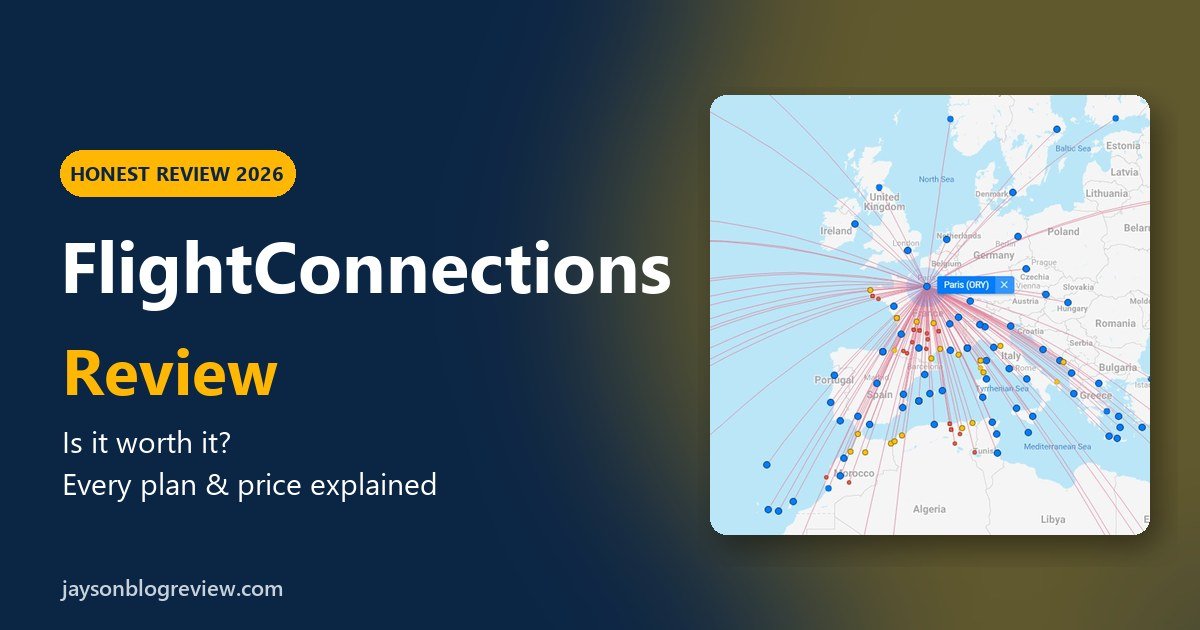
FlightConnections shows every airline route from an airport on one interactive world map.
If you have ever wondered which airlines fly non-stop from your home airport, or how to reach a faraway city with the fewest stops, you have probably landed on FlightConnections. This FlightConnections review looks at what the free map gives you, what the paid Premium upgrade adds, and whether the upgrade is worth paying for.
FlightConnections is not a booking site. It is a route-discovery tool: you pick an airport and the map draws every direct route, then lets you filter by airline, alliance, aircraft or travel date. This is a researched review, built from the official site, public pricing mentions and customer feedback. We did not test the product hands-on, so we stick to what is documented and what other users report. Short version: Premium is a good fit for frequent flyers and trip planners, and probably unnecessary for someone who checks a route twice a year.
Quick Verdict
- Best for: points-and-miles fans, flexible travellers, route nerds and anyone planning multi-city trips
- Skip if: you only need to check one or two routes occasionally, or you want a tool that books flights
- Price: free basic map; Premium is reported at roughly 35.88 euros a year (see the plans section for how reliable that figure is)
- Our rating: 3.8/5, based on feature set and published customer feedback rather than hands-on testing
What Is FlightConnections?
FlightConnections is a web and mobile flight route map. Instead of asking for dates and showing a list of fares, it starts from geography: choose a departure airport and the site shows every non-stop destination as a line on the map. You can click a destination to see which airlines serve it, add one or two stops to find connecting options, and open a list view sorted by city, country, distance or duration.
The idea is useful because ordinary booking engines hide most of the network. A traditional search only answers the question you already asked. A route map answers the question you did not know to ask, such as which regional carrier flies into a small airport near your destination. The FlightConnections Premium subscription layers more filters, longer schedules and an ad-free interface on top of that free base.
Is FlightConnections Legit?
Yes, it is a real, working service that has been listing flight routes for years, and the site is available in more than twenty languages and 21 currencies. It does not sell tickets, so there is no booking risk. Where opinions split is data quality and billing. Trustpilot showed a 2 out of 5 score from 18 reviews at the time of writing, so the sample is small. Critics mention outdated or incorrect routes, paywalled features, ads on the free version and renewals that surprised them. A few reviewers praise a quick refund and good connection suggestions. Treat the route data as a very strong starting point and always confirm a route on the airline's own website before you commit.
FlightConnections Free vs Premium: The Plans
1. Free Plan — Best for casual route checking
Price: free · Included: the interactive route map, non-stop and one- or two-stop route search, airport legend, list view · Best for: occasional planning
The free version is genuinely usable. You can search any airport, see its non-stop destinations on the map and look at stopover options. That alone answers the classic question of where you can fly directly from your home airport. The trade-off is that several of the more powerful filters are locked, and the site shows adverts. If you only look up a route now and then, the free tier may be all you ever need, and it is worth using it for a few weeks before you decide on FlightConnections Premium.
Pros
- Costs nothing and needs no card
- Shows the whole non-stop network from any airport
- Supports multiple languages and currencies
Cons
- Advertising on the page
- Several advanced filters are reserved for paying members
2. Premium Annual — Best for regular planners
Price: reported at about 35.88 euros a year (2.99 euros a month billed annually) at time of writing, November 2026 · Included: all filters, 12-month schedules, ad-free use, apps · Best for: people who plan several trips a year
The annual plan is flagged as the popular option inside the sign-up flow. Third-party travel blogs describe the cost as 2.99 euros a month billed once a year, which works out to 35.88 euros. The official page only shows prices once you start the sign-up process, so check the figure on screen before paying; it may differ by currency or have changed since those blogs were written. The pitch is simple: one low yearly fee unlocks everything the free map holds back, and the annual Premium plan is the cheapest way to get it per month.
Pros
- Lowest monthly cost of the paid options
- Unlocks every filter plus the mobile app
- Cancel anytime, according to the site's sign-up text
Cons
- Billed upfront for a year and set to renew
- Official price is not shown until sign-up
3. Monthly and Lifetime Options — Best for short trips or long-term fans
Price: shown at sign-up; not verified · Included: same Premium features · Best for: one-off planning sprints or heavy long-term users
The site's sign-up screens list Per Month, Annual and Lifetime choices. We could not confirm the monthly or lifetime prices without creating an account, so we will not quote numbers. The logic of each is easy to describe, though. A monthly plan suits someone planning one big trip who wants all the filters for a few weeks. A lifetime payment suits a committed user who expects to keep coming back for years. A separate Business version also exists, while the Personal plan is for personal use only. You can compare every option inside the Premium sign-up before paying anything.
Pros
- Flexible choices for different travel habits
- Lifetime access avoids annual renewals
Cons
- Exact prices need checking on the sign-up screen
- Personal plan cannot be used commercially
Standout Premium Features
4. Alliance and Airline Filters — Best for loyalty-program flyers
Price: included in Premium · Included: Oneworld, SkyTeam and Star Alliance filters, airline lists, favourite airlines · Best for: miles collectors
If you collect miles with one airline group, the alliance filter is the headline reason to upgrade. It narrows the map to routes operated by Oneworld, SkyTeam or Star Alliance members, so you see only the flights that earn or burn your points. Premium also lets you save and filter your favourite airlines and compare several carriers at once. That turns a messy global map into a personalised one, which is much of what makes FlightConnections Premium feel like a planning tool rather than a curiosity.
Pros
- Cuts the map down to the carriers you care about
- Saved airline lists save repeat effort
Cons
- Locked behind the paid plan
- Only helpful if you have a loyalty preference
5. Date, Time and Price Filters — Best for flexible travellers
Price: included in Premium · Included: search by date, departure and arrival time windows, schedules up to 12 months ahead, economy fares on the price map · Best for: deal hunters
These are the features that move the site from where do planes go to when and roughly for how much. You can filter flights by a date range, narrow departures and arrivals to a time window, and look at schedules up to a year ahead. The price map shows economy fare indications so you can spot cheaper destinations at a glance. These are indications, not bookable offers, so the sensible workflow is to find the idea here and then confirm the fare on an airline or fare-search site. For flexible travellers, the date and price filters are the most practical part of the subscription.
Pros
- Helps you pick a destination by budget
- Long schedule horizon aids early planning
Cons
- Prices are indicative only
- Does not replace a booking engine
6. Multi-Stop and Same-Airline Route Search — Best for complex itineraries
Price: included in Premium · Included: 0, 1 or 2 stop search, same-airline connections, aircraft, distance and duration filters · Best for: long-haul and multi-city trips
Choosing the number of stops is part of the route search, and the same-airline option is marked as a Premium feature in the interface. It lets you see connecting flights that stay with a single carrier, which can mean one ticket, simpler baggage handling and fewer missed-connection headaches. Premium also adds filters for aircraft type, flight distance and duration, handy if you prefer a certain plane or want to avoid very long sectors. The multi-stop search is especially good when no direct flight exists.
Pros
- Finds one-airline connections quickly
- Aircraft and duration filters add fine control
Cons
- Connection suggestions are not a substitute for airline booking tools
- Complex maps can feel busy on a phone
7. Ad-Free, Faster Experience and Apps — Best for heavy regular use
Price: included in Premium · Included: no advertisements, a faster experience, fullscreen map, iOS and Android app · Best for: frequent users
Not every benefit is a filter. Premium advertises an ad-free interface, a faster experience and a fullscreen route map, plus access to the mobile app. Whether that justifies a subscription depends on how often you use the site. For someone who opens the map weekly, a clean screen is a real quality-of-life upgrade, and the ad-free experience is the benefit most subscribers will notice first.
Pros
- Cleaner, quicker interface
- Works on mobile through the app
Cons
- Benefits matter less for rare users
Ease of Use and Data Accuracy
The interface is straightforward: pick an airport, see the lines, click a destination. The filter bar sits above the map, with Premium-only options clearly labelled, so you always know what you are missing. The learning curve comes from the sheer number of options, not from confusing design.
Data accuracy is the more important question. FlightConnections compiles schedules for a huge number of airlines, and the Premium schedule view runs up to twelve months ahead. Some Trustpilot reviewers say they found outdated or wrong routes and prices, which is a risk with any aggregated schedule database, especially for seasonal and low-cost carriers that change plans often. Our advice is to treat the map as discovery and always verify on the airline site. If you do that, the tool saves time without much downside.

FlightConnections radius search illustration, used to find airports within a chosen area.

Searching by drawing an area on the map helps compare nearby airports.
FlightConnections vs. Competitors
- Google Flights Explore: great for live fares and a map of cheap destinations, but it centres on prices for dates you enter, not on the full route network or alliance-level filtering.
- Skyscanner: strong for comparing fares across many booking sites and an everywhere search, but it is a booking-focused comparison tool rather than a route atlas.
- Airline route maps: accurate for a single carrier, but you have to check each airline separately, which is exactly what a combined map avoids.
The practical takeaway is that these tools complement each other. Use FlightConnections to learn which routes exist, then use a fare tool to price them.
Free Plan, Billing and Refunds
- Free plan: available without payment, supported by adverts and with several filters locked
- Annual billing: the sign-up text says the plan is billed and renews annually; the cost is reported by third parties at about 35.88 euros
- Cancellation: the sign-up flow states you can cancel anytime
- Refunds: we could not find a published refund policy, although one Trustpilot reviewer mentions receiving a quick refund
- Renewal warning: some reviewers say a renewal charge caught them off guard, so set a calendar reminder when you subscribe
- Personal vs Business: the Personal plan is for personal use only
How to Save on FlightConnections
There is no coupon code to quote, and we will not invent one. The honest savings routes are simple. First, start on the free version and only upgrade when you hit a filter you actually need. Second, the annual plan is reported to cost far less per month than paying monthly, so if you know you will use it for several months, annual is the better value; you can see the current options on the FlightConnections Premium page. Third, note your renewal date so you can cancel in time if you stop using it.
What Real Customers Say
Based on public reviews and travel-blog write-ups, the recurring praise is that the map makes route discovery fast, that alliance and airline filters are very useful, and that the connection suggestions are smart. The recurring complaints are that some route or price data can be outdated, and that billing and renewals confused certain users. With only 18 Trustpilot reviews and a low score, it is worth reading the latest feedback yourself before subscribing.
FAQ
Is FlightConnections free?
Yes, the basic route map is free with ads. Premium unlocks extra filters and removes the adverts.
How much is FlightConnections Premium?
Third-party blogs report about 2.99 euros a month billed annually, or 35.88 euros a year. Confirm the price on the official sign-up screen, which shows it only after you begin registration.
Can I book flights on FlightConnections?
No. It shows routes and indicative information, and you book with the airline or a travel site.
Does FlightConnections have an app?
Premium lists an iOS and Android app among its benefits.
Can I cancel Premium?
The sign-up text says you can cancel anytime. Check the account settings for the subscription management option.
Final Verdict
FlightConnections is one of the most useful free route-discovery tools available, and the paid upgrade makes sense if you plan trips regularly, care about alliances or want an ad-free map. If you fly rarely, stay on the free map. If you are a frequent planner, the reported yearly price is small compared with the time it can save, and you can look at the current plans through FlightConnections yourself. Just verify routes on airline sites and watch your renewal date.
How We Researched This Review
We reviewed the FlightConnections site and its Premium sign-up screens, searched for pricing mentions in travel blogs, and read a summary of Trustpilot feedback on 7 November 2026. We did not use the service ourselves, and anything we could not confirm, such as monthly and lifetime prices and refund terms, is flagged in the text above.